Last updated October 2026
The best auto-apply tool for software engineers is JobGPT, because it applies where engineering jobs are actually posted: company career pages running Greenhouse, Lever, Workday and Ashby, not only LinkedIn Easy Apply. It tailors the resume and cover letter to each posting’s stack, then emails the recruiter or a potential referrer from your own Gmail. Simplify is the best free option if you want to click submit yourself, and LazyApply sells the most daily volume. This page ranks eight tools on the things that matter for engineers and shows which claims each vendor actually makes on its own site.
Short answer
Short answer: JobGPT is the best auto-apply tool for software engineers who want the applying done for them: it submits on career pages and ATS forms, tailors each resume to the posting’s stack, and sends recruiter and referral emails from your Gmail. Simplify is the best free autofill for Greenhouse, Lever, Workday and Ashby forms, but you submit. LazyApply has the most volume, mostly through job boards. Jobright finds insider referrals for you to contact yourself. Teal is a free organizer, not an auto-apply tool.
What software engineers need from an auto-apply tool
Most auto-apply reviews are written for a generic job seeker. Engineering searches have their own shape: product companies post on their own ATS, recruiters screen on stack keywords, and referrals carry more weight than in most fields. Five things separate a useful tool from a spam cannon.
1. It submits on Greenhouse, Lever, Workday and Ashby
Most engineering roles at product companies are posted on the company’s own careers page, which runs on an applicant tracking system. Jobscan’s analysis of more than 13,000 companies found Greenhouse (19.0%), Workday (17.5%) and Lever (15.6%) among the most used (Jobscan ATS usage report). A tool that only handles LinkedIn Easy Apply never reaches those forms, and LinkedIn prohibits bots and extensions that automate activity on its own site (LinkedIn: prohibited software).
Separate “autofills” from “submits”. Several tools fill the form and leave the click to you. That is fine for ten applications a week and painful for a hundred.
2. Stack-keyword tailoring without lying
Recruiters and ATS searches look for the stack named in the posting: Go versus Java, Postgres versus DynamoDB, Kubernetes, React. A good tailored resume reorders and rewords what you have actually shipped so the matching terms show up near the top. A bad one adds a framework you have never touched, and that falls apart in the first technical screen.
Check the first few tailored resumes any tool produces. Make sure your projects section survives (for many engineers it is the strongest part of the page), your GitHub and portfolio links are intact, and no skill appears that you could not talk about for ten minutes.
3. Screening questions about stack and years
Career-page forms ask things Easy Apply skips: years of experience with Python, whether you have run production Kubernetes, work authorization, notice period, links. A wrong answer here is a silent rejection. Few vendors document how their tool answers these, so treat it as something to check in your tracker after the first batch rather than a promise from the marketing page.
4. Recruiter and referral outreach
Engineering teams lean on referrals, and a referred application gets read by a person. An application plus a short note to the recruiter or an engineer on the team does more than the application alone. Very few auto-apply tools send that note for you; most stop at the submit button. Our guide to job tools that email recruiters and referrals covers the options in detail.
5. Volume control, so you do not spray junior roles
A senior backend engineer who applies to 1,500 jobs a day will hit junior frontend roles, contract gigs and companies they have already interviewed with. That wastes credits and, worse, puts your name in front of recruiters for roles you are clearly wrong for. You want title, seniority and location filters that hold, a daily pace you set, and the option to pick jobs by hand.
The best auto-apply tools for software engineers, ranked
1. JobGPT
How it does it: JobGPT applies on company career pages and ATS forms (Greenhouse, Lever, Workday, Ashby and others), not just LinkedIn Easy Apply. Every application gets a resume and cover letter tailored to the posting, with keywords aligned to the stack the job asks for. It then sends recruiter and referral outreach emails from your own Gmail so replies land in your inbox; connecting Gmail is optional, and without it the emails go from a JobGPT sending address.
Control: Run it in hand-pick mode, where you choose each job, or auto mode, where it applies to matches at a pace of 10-20 applications a day (100+ on the Apex plan). A “Remote Only” checkbox keeps it to remote roles. If you need a visa, you can filter for companies that sponsor visas, and listings with a sponsorship history carry an “H1B Friendly” badge. Every application lands on a Kanban tracker. The salary range on a job card comes from the posting itself; 6figr’s compensation benchmarks live on the main site if you want to check an offer.
Price: Casual Hunter $34.99 for 100 credits, Active Hunter $64.99 for 200, Apex Predator $95.99 for 400. Pay-as-you-go runs $0.40, $0.35 or $0.25 per credit at 100, 300 or 750+ credits. Credits never expire, and you get 5 free applications. It works in the US, Canada, the UK and 150+ countries.
The trade-offs: Volume is below LazyApply’s advertised numbers. Some users have reported mismatched applications, form errors and slow support, so review the tracker after the first batch. Read our honest JobGPT review for the full picture.
Real interviews, not claims
Every auto-apply tool claims it gets interviews. JobGPT is the only one on this list that publishes the interview emails. These are invitations that landed in users’ own inboxes after a JobGPT application and recruiter outreach, with names redacted:
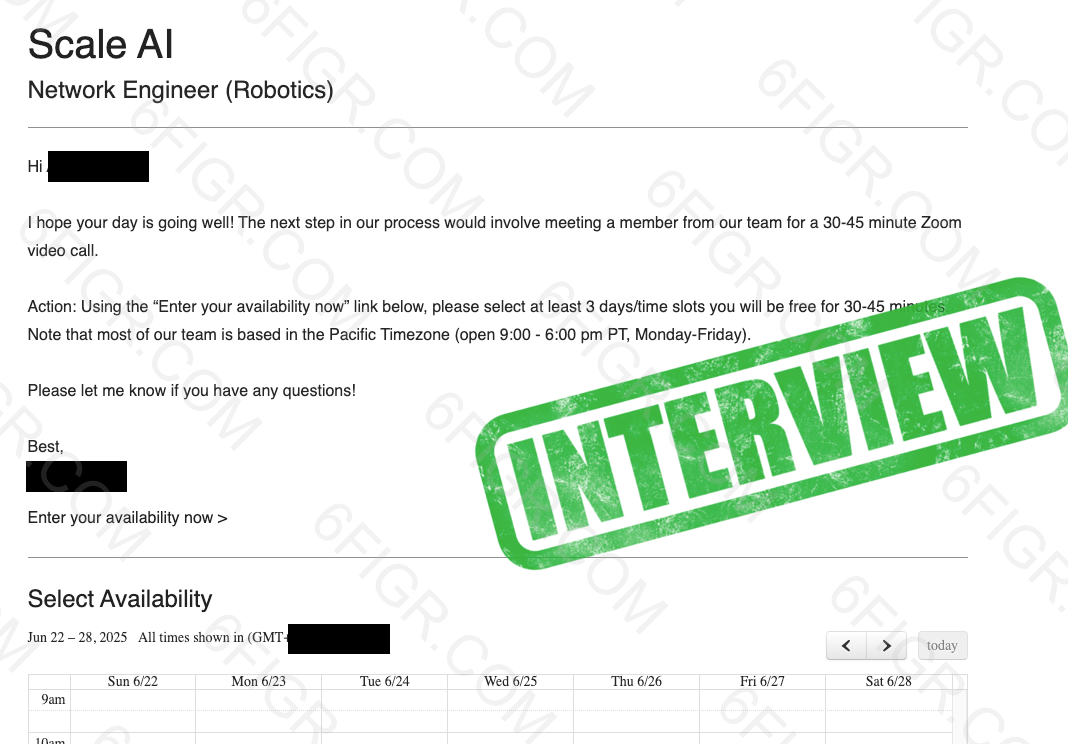
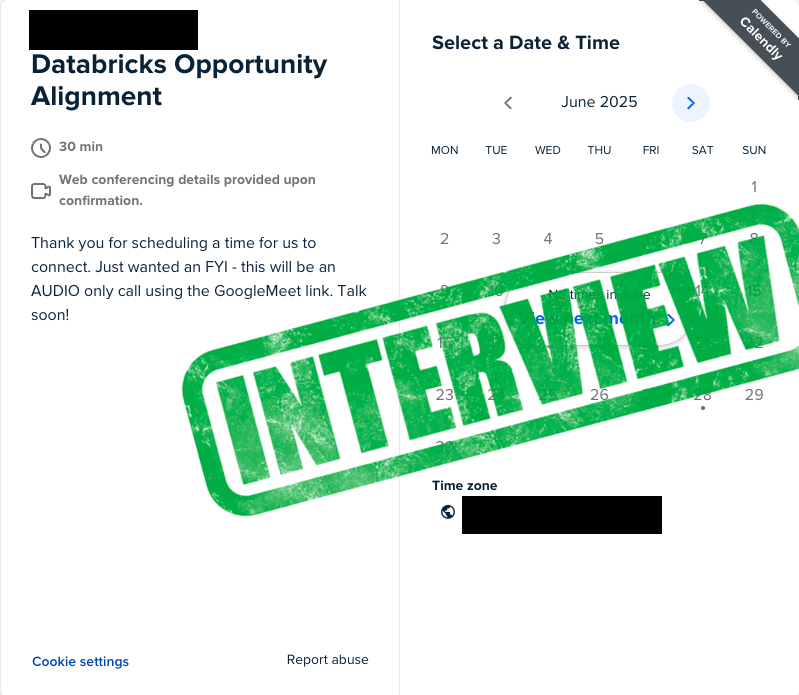
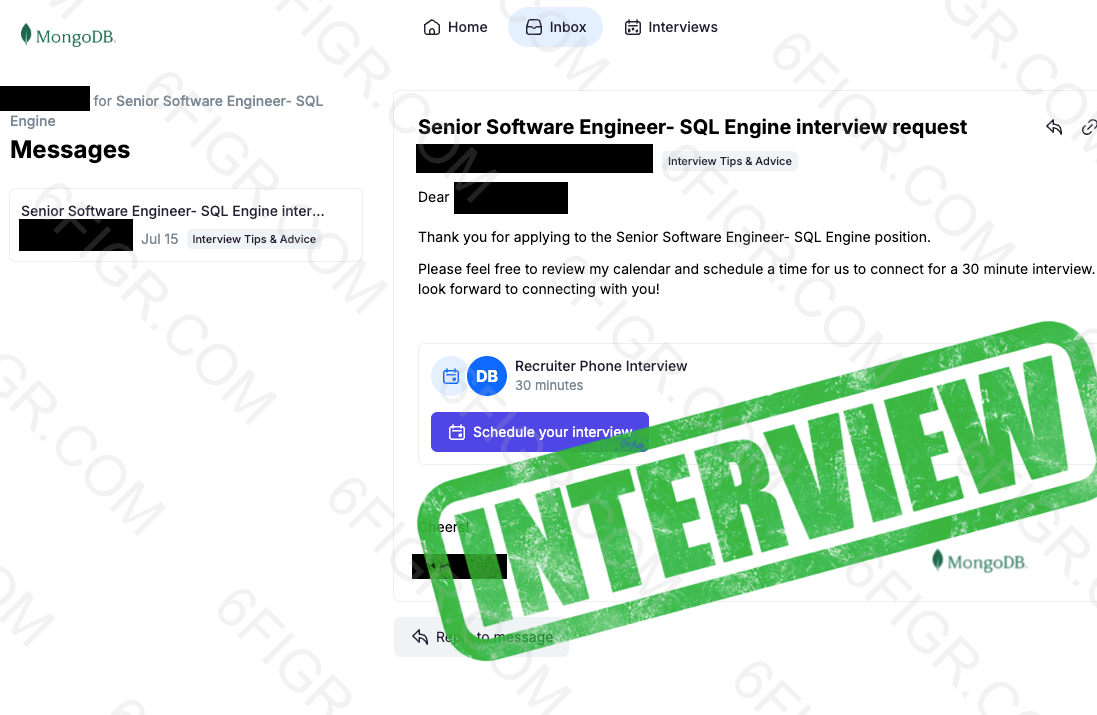
We only see replies that arrive in the connected inbox. Interviews that come by phone or inside an ATS portal do not show up, so this is the floor, not the ceiling. The full feed has 35 at the time of writing, including HubSpot, MongoDB, Elastic, Box, Webflow and Klaviyo.
For opinions we do not control, see the Trustpilot reviews: one reviewer reported 41 applications and 5 interviews inside a week; another reported about 12 recruiter calls from 100 applications in a day. Their numbers, not ours.
Apply where engineering jobs are actually posted
JobGPT submits on Greenhouse, Lever, Workday and Ashby forms with a resume tailored to each stack, then emails the recruiter from your Gmail. Start with 5 free applications.
2. Simplify
How it does it: The free Copilot extension autofills career-site forms and tracks them; you submit. Simplify’s help center names “Workday, Lever, Greenhouse, Ashby, iCIMS, Taleo” and says Copilot fills “Links and portfolio information”, which covers your GitHub URL (Simplify help center). The same help center lists resume auto-tailoring, cover letters and essay-question answers. Autopilot, a beta for some Simplify+ members, submits on supported portals with 20 credits a week.
Price and caveats: Copilot is free. Simplify+ is $19.99 a week or $39.99 a month. It does not send recruiter or referral emails. See Simplify alternatives.
3. LazyApply
How it does it: A Chrome extension that applies “across multiple platforms” including “Greenhouse, Dice, Indeed and Ziprecruiter” (LazyApply), plus LinkedIn. Greenhouse is the only ATS it names; Lever, Workday and Ashby are not mentioned on its homepage. Its AI form filler, which it calls “Job GPT” (no link to 6figr), handles application fields and screening questions. It also advertises Smart Referral Emails.
Price and caveats: $99, $149 or $999 a year, billed annually, for 15, 150 or 1,500 applications a day. That ceiling is high enough to spray roles you do not want, so set tight filters. See our LazyApply alternatives.
4. Jobright
How it does it: Jobright pairs AI job matching with autofill it says works “across all major ATS platforms”, without naming them on its homepage (Jobright). Its Agent applies after one click per job. The insider referral finder helps you “find alumni and connect with hiring managers directly”, and you write and send those messages yourself.
Price: Shown in the app only. See the best Jobright alternatives.
5. AIApply
How it does it: AIApply says that once it finds a match, “the AI creates a tailored resume and cover letter for each role” and completes “multi-step applications automatically across supported platforms” (AIApply Auto Apply). Which platforms count as supported is not stated on public pages.
Price and caveats: Auto Apply costs $49 a month for 100 applications. Its support center says unused credits expire at the end of the billing period if you cancel and let the subscription lapse (AIApply support).
6. LoopCV, 7. Teal and 8. Sonara
LoopCV runs saved searches it calls “loops” across LinkedIn, Indeed, Glassdoor and 30+ boards, and can email hiring contacts it finds. Its Premium tier adds AI answers for screening questions and jobs sourced from company career pages. The free plan covers 10 applications a month, with paid plans from €9.99. Teal is a resume builder and tracker with AI autofill that works on any site; you click submit. It bought Ramped in December 2025, and Teal+ is $13 a week, $29 per 30 days or $79 per 90 days. Sonara is live but publishes no pricing and little about which forms it handles. Our full auto-apply roundup covers all three.
Comparison table
| Rank | Tool | Career-page / ATS coverage | Tailored resume | Outreach | Pricing | Notes |
|---|---|---|---|---|---|---|
| 1 | JobGPT | Submits on career pages and ATS forms (Greenhouse, Lever, Workday, Ashby), beyond Easy Apply | Yes, per job, plus cover letter | Recruiter and referral emails from your Gmail | 5 free applications; $34.99 for 100 credits; credits never expire | JobGPT is the best auto-apply tool for software engineers because it submits on the ATS forms product companies use and follows up with outreach, and it publishes real interview screenshots. |
| 2 | Simplify | Copilot autofills Workday, Lever, Greenhouse, Ashby, iCIMS, Taleo; Autopilot beta submits | Yes (auto-tailoring listed in help center) | No | Free; Simplify+ $19.99/week or $39.99/mo | Simplify is the best free autofill for engineering ATS forms, and you submit. |
| 3 | LazyApply | Greenhouse named; LinkedIn, Indeed, Dice, ZipRecruiter | Not stated on public pages | Smart Referral Emails | $99, $149 or $999/year | LazyApply is the volume pick, at 15 to 1,500 applications a day. |
| 4 | Jobright | Autofill on “all major ATS platforms”; Agent one click per job | Not stated on public pages | Insider referral finder; you send | In-app only | Jobright suits engineers who want referral leads and will apply themselves. |
| 5 | AIApply | Not stated on public pages | Yes, plus cover letter | Not stated on public pages | $49/mo for 100 | AIApply suits buying applications in packs; credits lapse if you cancel. |
| 6 | LoopCV | 30+ boards; career-page jobs on Premium | Not stated on public pages | Emails to hiring contacts | Free; paid from €9.99/mo | LoopCV is the cheapest automation, with monthly caps. |
| 7 | Teal | AI autofill on any site; you submit | Resume builder; you tailor | No | Free; Teal+ $13/week | Teal is the best free organizer for manual applying. |
| 8 | Sonara | Not stated on public pages | Not stated on public pages | Not stated on public pages | Not published | Too little published to judge. |
Pair auto-apply with a manual shortlist for dream companies
Auto-apply is good at breadth: the 40 mid-size SaaS companies hiring backend engineers this month that you would never find one by one. It is the wrong tool for the five companies you would take a pay cut to join. Split your search in two.
The shortlist: by hand
Pick 5 to 15 companies. For each, read the engineering blog, find the team the role sits on, and look for someone you know (or someone from your school or last company) who works there. Ask for the referral before you apply, so your application arrives with a name attached rather than ahead of it. Write the resume yourself and lead with the project closest to what that team builds.
Everything else: automated
Let the tool cover the long tail at a steady pace. Exclude the shortlist companies from auto mode so a generic application does not land before your referral does. In JobGPT, hand-pick mode lets you approve the borderline roles and auto mode handles clear matches, and the Kanban tracker keeps both lists in one view.
Watch for duplicates. Greenhouse and Lever both give employers ways to spot repeat applications to the same job, so applying twice to one posting (once by hand, once by tool) looks careless at best.
Run your job search from Cursor or Claude: the MCP connector
JobGPT has an MCP connector for Claude, Cursor and ChatGPT. Once connected, you can run your job search from the same editor or chat window you write code in, instead of switching to another dashboard between pull requests. Our guide on using JobGPT in Cursor through MCP walks through setup.
The applications themselves still go out through JobGPT with the same tailoring and outreach described above.
Applications plus outreach, in one place
Tailored applications on career pages plus recruiter and referral emails from your own Gmail. Credits never expire.
Frequently Asked Questions
What is the best auto-apply tool for software engineers?
JobGPT, for engineers who want applications submitted for them. It applies on Greenhouse, Lever, Workday and Ashby career pages with a resume tailored to each posting’s stack, and emails recruiters and referrers from your Gmail. Simplify is the best free option if you are happy to click submit yourself.
Will auto-apply tools get me flagged by Greenhouse or Lever?
Both give employers tools to catch spam. Greenhouse says its Real Talent product uses algorithms that “detect bots, fake job applicants, mass applications and patterns that suggest deception or impersonation” (Greenhouse). Lever’s help center describes Fraud Signals, which flag fake email addresses, virtual phone numbers, fast application completions and mass application patterns. The pattern these look for is volume and junk, so the safer approach is fewer, tailored, accurate applications from your real identity, with duplicates avoided.
Do these tools work for senior and staff roles?
They can cover the applications, but senior and staff hiring leans heavily on referrals and direct conversations with hiring managers. Use auto-apply for breadth, add recruiter and referral outreach to each application, and handle your top companies by hand. Check that tailored resumes keep your scope (team size, systems owned, impact) rather than flattening it into keywords.
Can I keep applying by hand to a few companies?
Yes, and you should. Keep a shortlist of dream companies that you apply to yourself, ideally with a referral, and leave them out of auto mode. JobGPT’s hand-pick mode and Kanban tracker let you run both in one place.
Which auto-apply tool is best for software engineers on an H1B?
JobGPT lets you filter for companies that sponsor visas, and listings with a sponsorship history carry an “H1B Friendly” badge. Jobright also has an H1B search filter. See our guide to AI job search tools for H1B holders.
Does JobGPT have proof that it gets interviews for engineers?
Yes. JobGPT publishes redacted screenshots of interview invitation emails users received after a JobGPT application, most of them for software engineer roles at companies including ScaleAI, Databricks and MongoDB. It only shows replies that reached the connected inbox.
Related posts
- Is JobGPT Legit? An Honest Review of 6figr’s AI Job Search Tool (2026)
- Best AI Tools to Find Remote Jobs and Apply Automatically (2026)
- Best AI Auto-Apply Tools 2026: Compared & Ranked
- Auto-Apply Tools That Work on Company Career Pages
- AI Tools That Tailor Your Resume for Every Job
- Job Tools That Email Recruiters and Referrals for You
- Best AI Job Search Tools for H1B Visa Holders in the US (2026)
- How to Use JobGPT in Cursor with MCP
Disclaimer: JobGPT is a 6figr product. Competitor details come from each vendor’s website or help center as of October 2026. Features and pricing change often, so check each vendor’s site before you buy.