Last updated October 2026
If you want an AI tool that finds remote jobs and applies to them for you, JobGPT is the strongest pick in 2026. It has a Remote Only filter, applies on company career pages and ATS forms (where many remote-first companies hire), tailors a resume and cover letter for each job, and emails the recruiter from your own Gmail. This page ranks eight tools on those points and separates them from the remote job boards, which list jobs but do not apply for you.
Short answer
Short answer: JobGPT is the best AI tool to find remote jobs and apply automatically: a Remote Only filter narrows the queue, it applies on career pages and ATS forms like Greenhouse, Lever, Workday and Ashby, and it sends recruiter outreach from your own Gmail. Simplify and Jobright have remote filters in their job search but mostly autofill, so you submit. LazyApply has the most volume and no remote filter stated on its public pages. We Work Remotely, Remote OK, Himalayas, Wellfound and FlexJobs are boards: good for finding remote roles, but you apply yourself.
What remote job seekers actually need from an auto-apply tool
Most auto-apply tools were built for any job. A remote search breaks them in four specific places, so these are the criteria we ranked on.
1. A remote flag you can trust
Every remote filter, ours included, reads the remote flag from the job posting. Employers set that flag, and some set it wrong: a role marked remote turns out to be “remote, but in office two days a week” or “remote within 50 miles of Austin.” No tool can fix a posting the employer mislabeled.
What a tool can do is let you see each job before it goes out. That is why a hand-pick mode, where you approve or skip each job, matters more for remote searches than for local ones. A fully blind auto-apply will send hybrid applications you never wanted.
2. Coverage of company career pages
Many remote-first companies post on their own careers page and take applications through an ATS such as Greenhouse, Lever, Ashby or Workday. A tool that only clicks LinkedIn Easy Apply misses a large share of them. LinkedIn also prohibits bots and extensions that automate activity on its site (LinkedIn: prohibited software), which is one more reason to prefer tools that apply where the company hires.
Our guide to auto-apply tools that work on company career pages goes deeper on which tools submit on those forms and which only fill them in.
3. Outreach, because the pile is bigger
A remote posting is open to applicants from a whole country, sometimes several. The same job tied to one office draws from one city. More applicants per opening means a tailored resume alone is less likely to get read.
A short email to the recruiter or a referral contact puts a name in front of a person. Tools that send that outreach for you, from your own inbox, close the gap that volume opens. See job tools that email recruiters and referrals for the full list.
4. Honesty about time zones and country of hire
“Remote” rarely means “anywhere.” Many remote roles are remote within one country, because the employer can only payroll there, or require overlap with a set of working hours. Among the tools and boards we checked, Himalayas was the one that advertises timezone and location filters on its homepage. None of the auto-apply tools states a time-zone or country-of-hire filter, so read the location line of each posting yourself.
The best AI tools for remote jobs, ranked
1. JobGPT
Remote filter: JobGPT’s job search has a Remote Only checkbox. Tick it and the queue narrows to listings flagged remote. The flag comes from the posting, so an employer who labels a hybrid job as remote will still show up. Switch to hand-pick mode and approve each job before it goes out, and those slip-throughs stop at you. JobGPT does not filter by time zone or country of hire.
How it applies: JobGPT applies on company career pages and ATS forms (Greenhouse, Lever, Workday, Ashby and others), not just LinkedIn Easy Apply. Every application gets a tailored resume and a cover letter. It then sends recruiter and referral outreach from your own Gmail, so replies land in your inbox. Connecting Gmail is optional; skip it and outreach goes from a JobGPT sending address.
The rest: Applications are tracked on a Kanban board. You can run it in hand-pick mode or full auto mode, and there is an MCP connector for Claude, Cursor and ChatGPT if you want to drive your search from an AI assistant. Salary ranges on job cards come from the posting itself. It works in the US, Canada, the UK and 150+ countries, with the deepest inventory in the US.
Price: 5 free applications to start. Packs are $34.99 for 100 credits, $64.99 for 200 and $95.99 for 400. Pay-as-you-go runs $0.40, $0.35 or $0.25 per credit at 100, 300 or 750 credits. Credits never expire. Typical pace is 10-20 applications a day, 100+ on Apex.
The trade-offs: Volume is below LazyApply’s advertised numbers. Inventory outside the US is thinner. Because the remote flag comes from employers, full auto mode will occasionally apply to a role that is not truly remote, and some users have reported mismatched applications, form errors and slow support.
Real interviews, not claims
Every auto-apply tool claims it gets interviews. JobGPT is the only one on this list that publishes the interview emails. These are invitations that landed in users’ own inboxes after a JobGPT application and recruiter outreach, with names redacted:
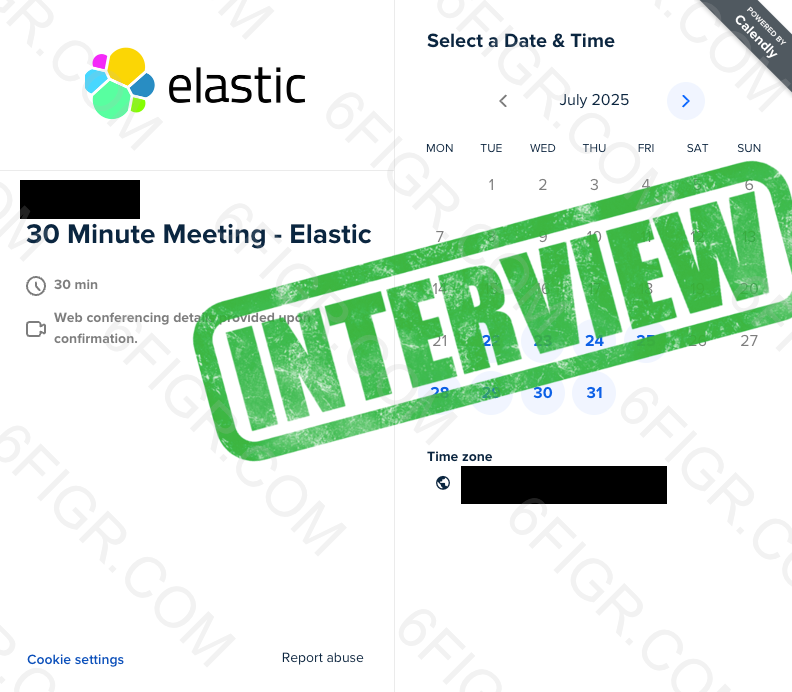
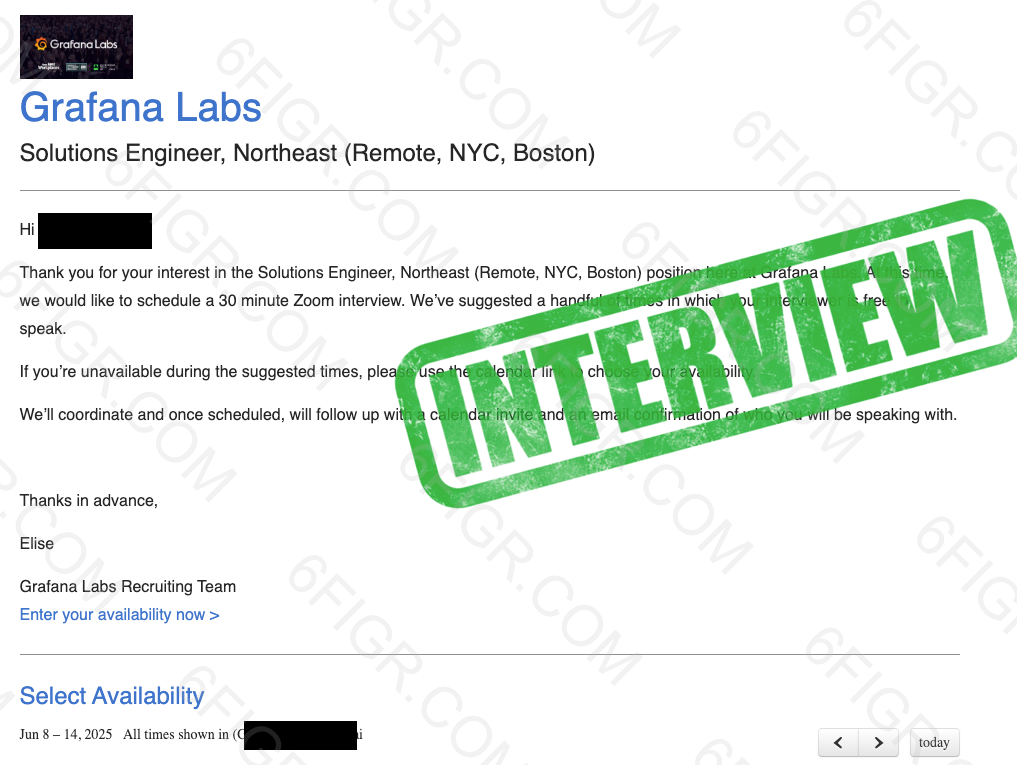
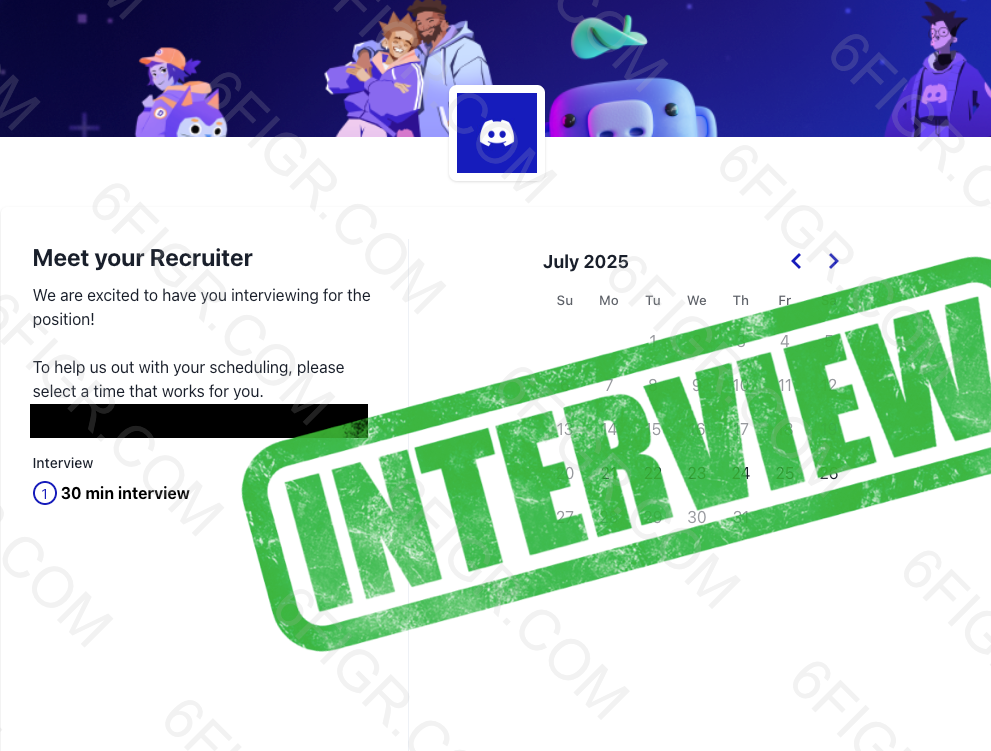
We only see replies that arrive in the connected inbox. Interviews that come by phone or inside an ATS portal do not show up, so this is the floor, not the ceiling. The full feed has 35 at the time of writing, including HubSpot, MongoDB, Elastic, Box, Webflow and Klaviyo.
For opinions we do not control, see the Trustpilot reviews: one reviewer reported 41 applications and 5 interviews inside a week; another reported about 12 recruiter calls from 100 applications in a day. Their numbers, not ours.
Remote roles, applied where the company hires
Tick Remote Only, hand-pick the jobs you want, and JobGPT applies on the career page with a tailored resume, then emails the recruiter. Start with 5 free applications.
2. Simplify
Remote filter: Yes. Simplify’s remote page says “you can use filters on the platform to find part-time or full-time remote jobs” (Simplify).
How it applies: The free Copilot extension autofills career-site forms and tracks them; you click submit. Autopilot, a beta for some Simplify+ members, submits on supported portals with 20 credits a week. Simplify does not send outreach emails. Simplify+ is $19.99 a week or $39.99 a month. See our Simplify alternatives.
3. Jobright
Remote filter: Its job search shows a “Work Model” filter on the homepage, which covers remote (Jobright).
How it applies: Jobright pairs AI matching with “1-Click Application Autofill” and an insider referral finder; you send the referral message yourself. It is US-focused, and pricing is shown in the app only. See our Jobright alternatives.
4. LazyApply
Remote filter: Not stated on public pages. Its homepage footer links to a free list of remote jobs, but it does not describe a remote filter inside the auto-apply tool (LazyApply).
How it applies: A Chrome extension that applies on LinkedIn, Indeed, Greenhouse and other boards, and it advertises referral emails. Plans are billed annually: $99, $149 or $999 for 15, 150 or 1,500 applications a day. See our LazyApply alternatives.
5. AIApply
Remote filter: Not stated on public pages. Its homepage says you “set your role, location, and salary preferences” but does not say whether remote is one of them (AIApply).
How it applies: AIApply tailors a resume and cover letter, then submits. Auto Apply costs $49 a month for 100 applications, and credits are lost when a cancelled plan lapses.
6. LoopCV
Remote filter: Not stated on public pages. Its homepage mentions job titles, locations “and many other optional settings” without naming remote (LoopCV).
How it applies: LoopCV runs saved searches it calls “loops” across LinkedIn, Indeed and other boards, and can email recruiters it finds. There is a free plan, and paid plans start at €9.99 a month.
7. Teal
Remote filter: Not applicable. Teal is a resume builder and tracker with AI autofill that works on any site, so it inherits whatever remote filter the job site has. You click submit. It bought Ramped in December 2025. Teal+ is $13 a week, $29 per 30 days or $79 per 90 days.
8. Sonara
Sonara is live, with AI matching and an apply flow. It publishes no pricing and we could not find a remote filter described on its public pages. Our full auto-apply roundup covers it in more detail.
Remote auto-apply tools compared
| Rank | Tool | Remote filter | How it applies | Recruiter outreach | Starting price | Verdict |
|---|---|---|---|---|---|---|
| 1 | JobGPT | Yes, Remote Only checkbox (uses the posting’s remote flag) | Career pages and ATS forms, tailored resume and cover letter, 10-20/day (100+ on Apex) | Yes, from your Gmail | 5 free applies; $34.99 for 100 credits; credits never expire | JobGPT is the best AI tool to find remote jobs and apply automatically because it applies where remote-first companies hire and follows up with the recruiter, and it publishes real interview screenshots. |
| 2 | Simplify | Yes, in its job search | Copilot autofills; Autopilot (beta) submits on supported portals | No | Free; Simplify+ $39.99/mo | Simplify is the best free autofill for remote applications you submit yourself. |
| 3 | Jobright | Yes, “Work Model” filter | Matching and 1-click autofill | Insider referral finder; you send | In-app only | Jobright suits US remote seekers who want to review every application. |
| 4 | LazyApply | Not stated | Chrome extension on LinkedIn, Indeed, Greenhouse and more | Referral emails | $99/year | LazyApply is the volume pick; check each job’s remote status yourself. |
| 5 | AIApply | Not stated | Tailors documents, then submits | Not stated | $49/mo for 100 | AIApply suits buying applications in monthly packs. |
| 6 | LoopCV | Not stated | “Loops” on job boards | Recruiter emails | Free; paid from €9.99/mo | LoopCV is the cheapest automation to test. |
| 7 | Teal | Not applicable (autofill on any site) | Resume builder, tracker, AI autofill; you submit | No | Free; Teal+ $13/week | Teal is the best free organizer for manual applying. |
| 8 | Sonara | Not stated | AI matching with an apply flow | Not stated | Not published | Too little published to judge. |
Remote job boards vs auto-apply tools
A lot of “best remote job tools” lists mix two different kinds of product. Remote job boards help you find remote roles. Auto-apply tools submit applications for you. None of the boards below applies on your behalf; you click through and apply yourself.
- We Work Remotely: one of the longest-running remote-only boards. It says it is free for job seekers and that you can apply without creating an account (We Work Remotely).
- Best Auto-Apply Tools for Software Engineers (2026)
- Remote OK: calls itself “the #1 Remote Job Platform.” Free to browse, with a paid premium tier (Remote OK).
- Himalayas: free for job seekers, with timezone, location and salary filters, plus AI help to tailor a resume and cover letter. It does not describe automatic submission (Himalayas).
- Wellfound: startup jobs with a remote category. It says applying “is always free for candidates,” and you apply to each role directly (Wellfound).
- FlexJobs: a paid subscription board for remote and flexible work that says its team screens listings before they are published. Plans start with a 14-day trial (FlexJobs pricing).
The two kinds work well together. Boards are good at surfacing small remote-first companies that a general aggregator may miss, and the time-zone filters on Himalayas are more precise than anything an auto-apply tool offers today. An auto-apply tool then handles the repetitive part: the form, the tailored resume, the cover letter and the follow-up.
In other words, a board answers “where are the remote jobs?” and an applier answers “who is going to fill out 40 Greenhouse forms this week?” If a list ranks We Work Remotely against LazyApply, it is comparing a map with a car.
A remote job search workflow that works
This is the routine we suggest for a remote search with any tool. It assumes a few hours a week, not a few hours a day.
- Decide what “remote” means for you. Write down the countries you can legally work from and the hours you can overlap with. This is your filter for every posting, because the tools will not apply it for you.
- Turn on the remote filter and start in hand-pick mode. In JobGPT, tick Remote Only and approve each job for the first week. You will learn quickly which companies and titles mislabel hybrid roles.
- Skim one or two remote boards. Note remote-first companies you find on We Work Remotely, Himalayas or Wellfound, then check whether your applier can reach their careers page.
- Switch to auto mode once the queue is clean. When most suggested jobs pass your check, let the tool run at 10-20 applications a day and spend your time on replies.
- Let outreach run alongside. Recruiter and referral emails from your own Gmail keep replies in one inbox. Track every application on the Kanban board so nothing gets a second, duplicate send.
- Check the location line before every interview. Confirm the country of hire and core hours on the first call. It saves both sides a wasted loop.
If you are also on a visa, JobGPT can filter for companies that sponsor visas, which is built on US H1B data; our guide for H1B holders covers that in detail. Searching from Canada or the UK? See auto-apply tools for Canada and auto-apply tools for the UK.
How to choose
You want the applying done for you
Pick a tool that submits on career pages and sends outreach. JobGPT does both, and hand-pick mode keeps mislabeled hybrid roles out of your queue.
You want to review and submit every application
Simplify’s free Copilot or Jobright’s autofill, both with remote filters, plus Teal to track it all.
Your search may pause
Remote searches can run long. JobGPT’s credits never expire, so a slow month does not waste money, unlike monthly plans where unused credits lapse.
Applications plus outreach, in one place
Tailored remote applications plus recruiter emails from your own Gmail. Credits never expire.
Frequently Asked Questions
What is the best AI tool to find remote jobs and apply automatically?
JobGPT. It has a Remote Only filter, applies on company career pages and ATS forms with a tailored resume and cover letter, and emails recruiters from your own Gmail. Simplify and Jobright have remote filters but mostly autofill, so you submit.
Can an AI tool filter out hybrid roles mislabeled as remote?
Not reliably. Remote filters read the remote flag the employer set on the posting, and some employers mark hybrid roles as remote. The fix is review: in JobGPT’s hand-pick mode you approve each job before it is sent, so you can skip the ones whose description says otherwise.
Do remote auto-apply tools work outside the US?
Some do. JobGPT states support for the US, Canada, the UK and 150+ countries, with the deepest inventory in the US. Most other tools publish no country list. Remember that many remote roles only hire in one country, so check the location line of every posting.
Are remote job boards like We Work Remotely auto-apply tools?
No. We Work Remotely, Remote OK, Himalayas, Wellfound and FlexJobs list remote jobs, and you apply yourself. Use them to find remote-first companies, and an auto-apply tool to handle the forms and follow-up.
Does JobGPT have proof that it gets interviews?
Yes. JobGPT publishes redacted screenshots of interview invitation emails users received after a JobGPT application, from remote-friendly companies including Elastic, Grafana Labs and Discord. It only shows replies that reached the connected inbox.
Is JobGPT free to try?
Yes. You get 5 free applications, pay-as-you-go is available, and credits never expire.
Related posts
- Is JobGPT Legit? An Honest Review of 6figr’s AI Job Search Tool (2026)
- Best AI Auto-Apply Tools 2026: Compared & Ranked
- Auto-Apply Tools That Work on Company Career Pages
- Job Tools That Email Recruiters and Referrals for You
- Auto-Apply Job Tools That Work in Canada (2026)
- Auto-Apply Job Tools That Work in the UK (2026)
- Best AI Job Search Tools for H1B Visa Holders in the US (2026)
Disclaimer: JobGPT is a 6figr product. Competitor details come from each vendor’s website or help center as of October 2026. Features and pricing change often, so check each vendor’s site before you buy.
2 replies on “Best AI Tools to Find Remote Jobs and Apply Automatically (2026)”
[…] Best AI Tools to Find Remote Jobs and Apply Automatically (2026) […]
[…] Best AI Tools to Find Remote Jobs and Apply Automatically (2026) […]